EMAGENIT
NASA Award
|
 |
|
EMAGENIT
received an award for its involvement with NASA JPL
in helping redesign and integrate their conceptual
Rover mission software in Microsoft Excel. Click the
picture above for more detail about our Rover
involvement. To learn more about the NASA mission to
mars
click here. |
|
Awards & Customers |
About Our Public
Microsoft Excel Training
|
- EMAGENIT has been providing
Excel and Excel VBA training for over 10 years.
- Our instructors not only
train, they build software for Excel using VBA and Visual
Basic .Net as well.
- EMAGENIT provides Beginning
Excel training
- EMAGENIT provides
Intermediate Excel Training
- EMAGENIT provides Advanced
Excel Training
Our beginning, intermediate, advanced
and VBA public Excel training workshops are designed for
business professionals looking to make the most out of their
daily Excel use. Our training is presented using "hands-on"
examples and covers both Mac and Windows users. Our instructors
use MacBook Pros (intel-based dual core) running Windows as well
as Mac OS X operating systems for dual instruction issues. Our
public workshop schedule for our Microsoft Excel training is
presented to the right.
|
About Our Public Microsoft Excel VBA Training
|
- EMAGENIT provides Beginning
Microsoft Excel VBA training (Excel Macros are designed
using VBA)
- EMAGENIT provides Advanced
Microsoft Excel VBA training (Excel Macros are designed
using VBA)
Our Microsoft Excel VBA training
workshops are for business professionals, engineers and
scientists. Our macro training covers the basics to the most
advanced topics and is taught "hands-on". Our instructors use
MacBook Pros (intel-based dual core) running Windows as well as
Mac OS X operating systems for dual instruction issues. Our
public workshop schedule for our VBA Excel Macro training is
presented to the right.
|
What is Included in the Price?
|
-
Our full Excel manual, over 1600
pages of examples and text.
-
Our entire
Microsoft Excel add-in software suite.
-
You can
repeat the workshop at
no extra charge and no time limit.
We welcome repeat visits.
|
|
Public Training
Locations |
|
Our public workshops are
held in Thousand Oaks (TO), California which is in the
vicinity of Los Angeles county (LA County), Ventura
county, Santa Barbara county and San Diego county.
We hold all of our on-site
Microsoft Excel courses nation wide.
Our public workshops are a short commute for those
living in the San Fernando Valley, Santa Clarita,
Newbury Park, Camarillo, Calabasas, Sherman Oaks,
Reseda, Woodland Hills, Hollywood, Fillmore,
Ventura, Moorpark, Simi Valley, Santa Monica and
Oxnard areas. |
|
Payment Options |
|
EMAGENIT accepts Visa,
MasterCard, Discover Card and American Express.
Click here
for more payment options and our mailing address. |
|
Pricing and Discounts
|
|
EMAGENIT
offers discounts for companies sending 3 or more
attendees to our VBA classes.
Military and government
discounts are also available. Contact us for more
details. |
Why Use
EMAGENIT?
|
-
We have
been developing software in Microsoft Excel for over 11 years.
-
Our Excel
self study and Excel Visual Basic self study manuals are not
your generic Excel books
-
We offer a wide variety of
Microsoft Excel workshops and Microsoft Excel Visual Basic
workshops for beginning through Excel power users
-
We develop
Microsoft Excel applications for companies like Northrop
Grumman, NASA JPL and Caterpillar so whom better to learn from
than a company that actually uses it
-
We cover
Excel 97 and beyond
|
|
Public Workshop Spotlight
|
|
Public Dates: (7/28-7/29),(9/22-9/23) |
|
|
Type: Business
Professionals
Platform: Windows
Versions: 97-2007
Training:
Hands-On
Hotel: Thousand Oaks
Inn
Webcast: Details,
Signup
Onsite Training:
Details
Repeat
your public workshop as many times as you want, no date or repeat
limit.
Consult our
Training Guide
to help decide on the right workshop.
What Is VBA? |
|
Overview:
This workshop covers the fundamentals of using VBA
programming. It
covers
VBA fundamentals
such as loops, variables and logic and controlling Microsoft
Excel, Microsoft Word and PowerPoint using VBA. This
workshop also covers
data processing
using Excel and VBA including single
data sheet, multi data sheet
problems and summary sheets. It also covers
automated chart construction
and
beginning dashboard topics.
It uses real world examples that lets you start building
macros in Excel right away.
We also cover personal examples
as part of our instruction. |
 |
|
Public Dates: (9/8) |
|
|
Type: Business Professionals
Platform: Windows or Mac
Versions: 97-2007
Training:
Hands-On
Hotel: Thousand Oaks
Inn
Onsite Training:
Details
Repeat
your public workshop as many times as you want, no date or repeat
limit.
Consult our
Training Guide
to help decide on the right workshop.
What Is VBA? |
Overview:
Learn fundamental
Microsoft Excel skills
like
-
Basic data entry
-
Number formatting
-
Basic formula
construction
-
How to use SUM, Max and
Min
-
Coping and pasting
-
Sorting and
filtering data
-
Basic worksheet
formatting like bolding, aligning, row/column
adjustments and more
We also cover personal
examples as part of our
instruction. |
 |
|
Public Dates: (7/10),(9/9) |
|
|
Type: Business Professionals
Platform: Windows or Mac
Versions: 97-2007
Training:
Hands-On
Hotel: Thousand Oaks
Inn
Onsite Training:
Details
Repeat
your public workshop as many times as you want, no date or repeat
limit.
Consult our
Training Guide
to help decide on the right workshop.
What Is VBA? |
Overview:
Learn Microsoft Excel intermediate skills like:
-
Filtering data
using Auto Filter and Advanced Filter
-
Working
with text files using Text Wizard and Text to Columns
-
Using Data Validation
and Conditional
Formatting
-
Perform table
lookups using VLookup and HLookup
-
Build
summary/pricing worksheets
-
Build array formulas
using VLookup, HLookup, CountIf,
Match and SumIf...etc
-
Use logic in
formulas (IF, And, Or)
-
Name cells and
ranges
-
Create dynamic
ranges in formulas that adjust to data
-
Build basic pivot
tables and more
We also cover personal examples as
part of our instruction. |
 |
|
Public Dates: (7/11),(9/10) |
|
|
Type: Business Professionals
Platform: Windows or Mac
Versions: 97-2007
Training:
Hands-On
Hotel: Thousand Oaks
Inn
Onsite Training:
Details
Repeat
your public workshop as many times as you want, no date or repeat
limit.
Consult our
Training Guide
to help decide on the right workshop.
What Is VBA? |
Overview:
Learn advanced Microsoft Excel skills like:
-
Building
forms using ActiveX controls
-
Building dashboards using
array formulas, charts and drawing shapes
-
Querying databases
-
Advanced
data filtering
-
Pivot table construction
-
Linking Excel with other programs like
Word
-
Macro recording and
more
We also cover personal
examples as part of our instruction. |
 |
|
Public Dates: (7/28-7/29),(9/22-9/23) |
|
|
Type: Business
Professionals
Platform: Windows
Versions: 97-2007
Training:
Hands-On
Hotel: Thousand Oaks
Inn
Webcast: Details,
Signup
Onsite Training:
Details
Repeat
your public workshop as many times as you want, no date or repeat
limit.
Consult our
Training Guide
to help decide on the right workshop.
What Is VBA? |
|
Overview:
This workshop covers the fundamentals of using VBA
programming. It
covers
VBA fundamentals
such as loops, variables and logic and controlling Microsoft
Excel, Microsoft Word and PowerPoint using VBA. This
workshop also covers
data processing
using Excel and VBA including single
data sheet, multi data sheet
problems and summary sheets. It also covers
automated chart construction
and
beginning dashboard topics.
It uses real world examples that lets you start building
macros in Excel right away.
We also cover personal examples
as part of our instruction. |
 |
|
Public Dates:
(7/30-8/1),(9/24-9/26) |
|
|
Type: Business
Professionals
Platform: Windows
Versions: 97-2007
Training:
Hands-On
Hotel: Thousand Oaks
Inn
Web Cast: Details,
Signup
Onsite Training:
Details
Repeat
your public workshop as many times as you want, no date or repeat
limit.
Consult our
Training Guide
to help decide on the right workshop.
What Is VBA? |
|
Overview:
This workshop covers advanced VBA topics such as
advanced data processing,
automated chart construction
for multi worksheets; advanced
control techniques of other applications such as Microsoft
Word and Microsoft PowerPoint;
advanced dash board construction
using charts, pictures, ActiveX controls and drawing shapes;
wizard construction using
userforms;
advanced worksheet layout
including navigation;
database communication
using ADO and DAO; communicating with other computer
languages like PERL and C and
advanced report generation.
It uses real world examples that lets you take your Excel
applications to the top level.
We also cover personal
examples as part of our instruction. |
 |
|
Public Dates: (9/29-10/1) |
|
|
Type: Business
Professionals
Platform: Windows
Versions: 97-2007
Training:
Hands-On
Hotel: Thousand Oaks
Inn
Web Cast: Details,
Signup
Repeat
your public workshop as many times as you want, no date or repeat
limit.
Consult our
Training Guide
to help decide on the right workshop.
What Is VBA? |
|
Overview:
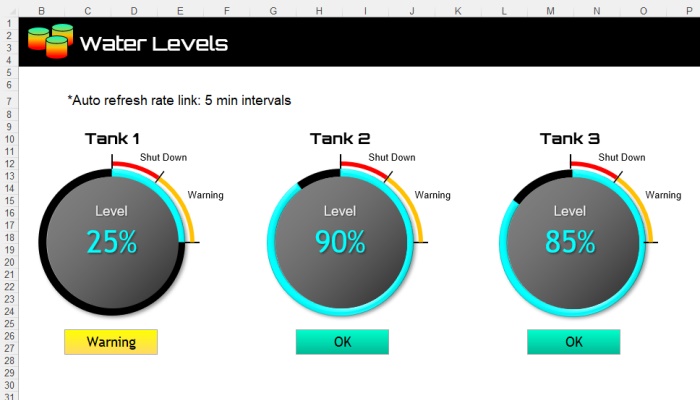
This workshop covers how to make
sophisticated dashboard layouts
in Microsoft Excel. Taught is how to use charts, pictures,
drawing shapes, the worksheet and VBA in combination with
each other to create visually stunning and functional Excel
dashboard displays. Learn how to animate Microsoft Excel
constructing timelines,
calendars, performance meters, process maps
and a lot more. The course also covers
database communication,
chart
construction
and
data processing techniques
using VBA. Great for visualizing data stored in external databases
and Microsoft Excel based tables.
We
also cover personal examples as part of our instruction. |
 |
|
Public Dates: (July closed),(9/15-9/16) |
|
|
Type: Engineers and Scientists
Platform: Windows
Versions: 97-2007
Training:
Hands-On
Hotel: Thousand Oaks
Inn
Web Cast: Details,
Signup
Onsite Training:
Details
Repeat
your public workshop as many times as you want, no date or repeat
limit.
Consult our
Training Guide
to help decide on the right workshop.
What Is VBA? |
|
Overview:
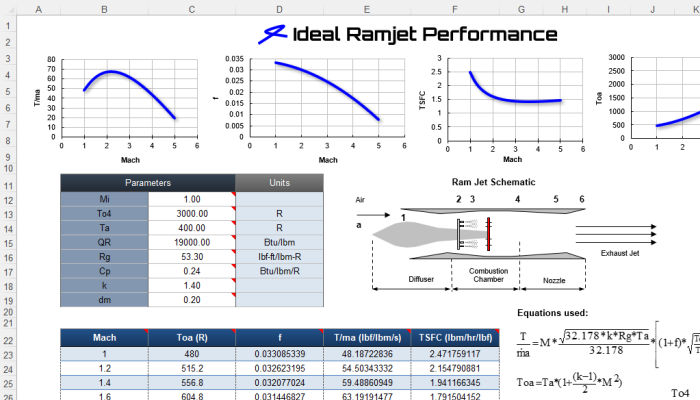
This workshop
covers the fundamentals of using VBA programming in the engineering
and science world. From loops,
variables and logic to controlling Microsoft Excel, Microsoft Word
and PowerPoint to data processing. It also covers automated
engineering chart
construction, beginning dashboard topics, system modeling, custom
worksheet functions (UDF's) and numerical analysis approaches. It uses real
engineering and science examples that lets you start building
useable macros in
Excel right away.
We also cover personal examples as
part of our instruction. |
 |
|
Public Dates:
(July closed),(9/17-9/19) |
|
|
Type: Engineers and Scientists
Platform: Windows
Versions: 97-2007
Training:
Hands-On
Hotel: Thousand Oaks
Inn
Webcast: Details,
Signup
Onsite Training:
Details
Repeat
your public workshop as many times as you want, no date or repeat
limit.
Consult our
Training Guide
to help decide on the right workshop.
What Is VBA? |
|
Overview:
This workshop covers
advanced engineering and science VBA topics such as automated
engineering chart construction for multi
worksheets; advanced control techniques of other applications such
as Microsoft
Word and
Microsoft PowerPoint; advanced engineering dash board
construction
using
charts, pictures, ActiveX controls and drawing shapes;
engineering wizard construction
using userforms; advanced worksheet layout
including navigation; advanced system modeling; team linking; database
communication using ADO and DAO and communicating with other computer languages like
FORTRAN. It
uses real world examples that lets you take your Excel applications
to the top level.
We also cover personal examples as
part of our instruction. |
 |
|
|